|
|
|
|
7.0. The Scope Program - Part B |
|
|
|
|
|
7.0. The Scope Program - Part B |
|
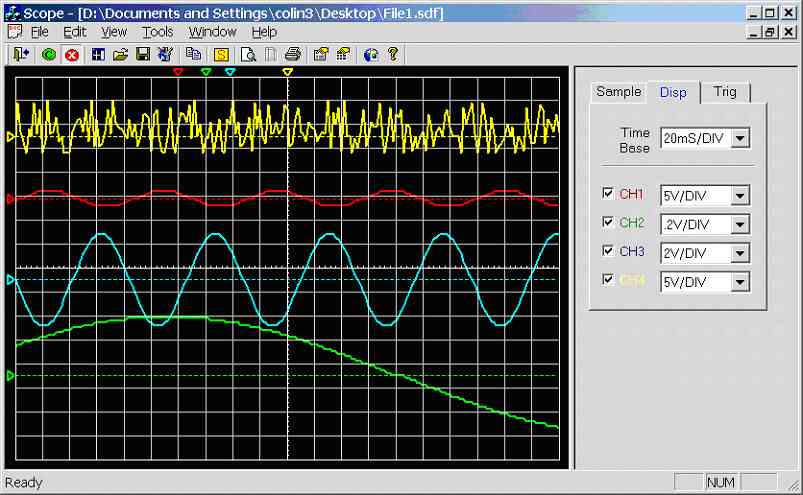 Figure 7.8a.
Scope data saved to File1.sdf (Scope V1.040a, 07/04/2002)
*.sdf
is the file extension used, it is short for Scope Data File.
If the
user clicks on menu item [File] [Save] the following function is called: -
Figure 7.8a.
Scope data saved to File1.sdf (Scope V1.040a, 07/04/2002)
*.sdf
is the file extension used, it is short for Scope Data File.
If the
user clicks on menu item [File] [Save] the following function is called: -
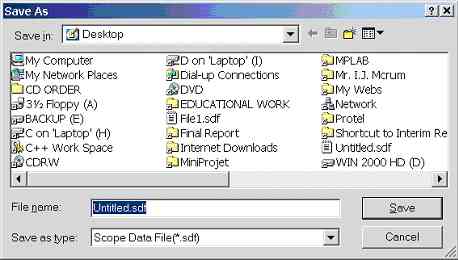 Figure 7.8b.
Windows standard CFileDialog box
This
function creates and writes the scope data file: -
Figure 7.8b.
Windows standard CFileDialog box
This
function creates and writes the scope data file: -
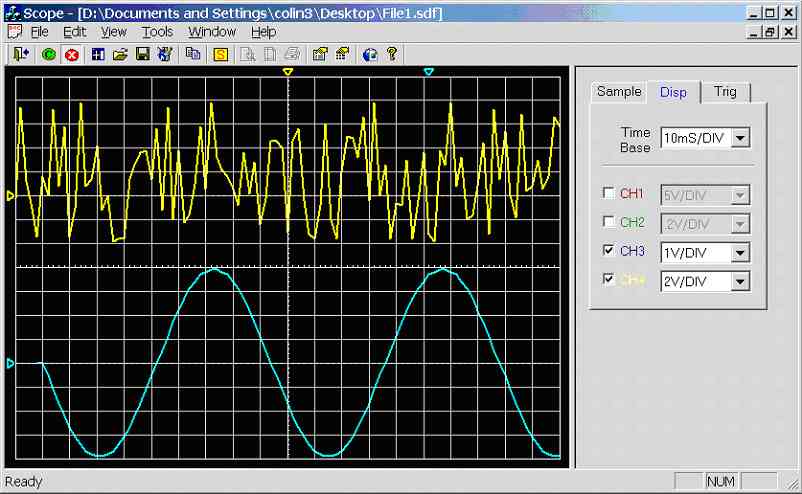 Figure 7.8c.
Example: File1.sdf has been opened, then CH1/CH2 was disabled with voltage /
time-base scales modified
Figure
7.8c. demonstrates the potential of this feature, File1.sdf has been loaded.
Channel 1 and Channel 2 has been disabled (Hidden), voltage and time-base
scales have been modified. Zero point of channels 3 and 4 has been moved and a
large offset has been applied to channel 3.
Figure 7.8c.
Example: File1.sdf has been opened, then CH1/CH2 was disabled with voltage /
time-base scales modified
Figure
7.8c. demonstrates the potential of this feature, File1.sdf has been loaded.
Channel 1 and Channel 2 has been disabled (Hidden), voltage and time-base
scales have been modified. Zero point of channels 3 and 4 has been moved and a
large offset has been applied to channel 3.
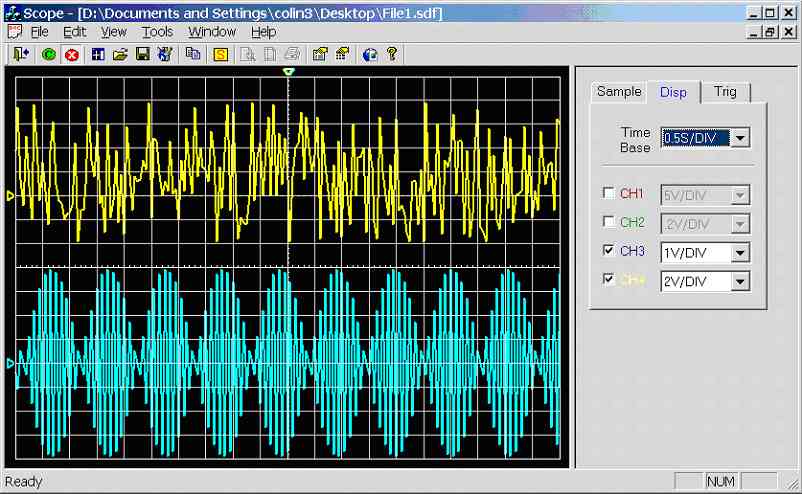 Figure 7.8d.
Demonstrating aliasing by selecting a out of range time-base
It is
important to remember that the saved waveforms are with respect to the
original sample rate. The scope program increases the time-base by skipping
readings and decreases the time-base by duplicating readings. As shown in
figure 7.8d. it is possible for aliasing to occur if the selected time-base
requires for less than 2 samples per cycle to be displayed, hence it is
important to make sure the sample-rate is optimal for the waveform being
monitored before saving.
File1.sdf (235kB): -
Figure 7.8d.
Demonstrating aliasing by selecting a out of range time-base
It is
important to remember that the saved waveforms are with respect to the
original sample rate. The scope program increases the time-base by skipping
readings and decreases the time-base by duplicating readings. As shown in
figure 7.8d. it is possible for aliasing to occur if the selected time-base
requires for less than 2 samples per cycle to be displayed, hence it is
important to make sure the sample-rate is optimal for the waveform being
monitored before saving.
File1.sdf (235kB): -
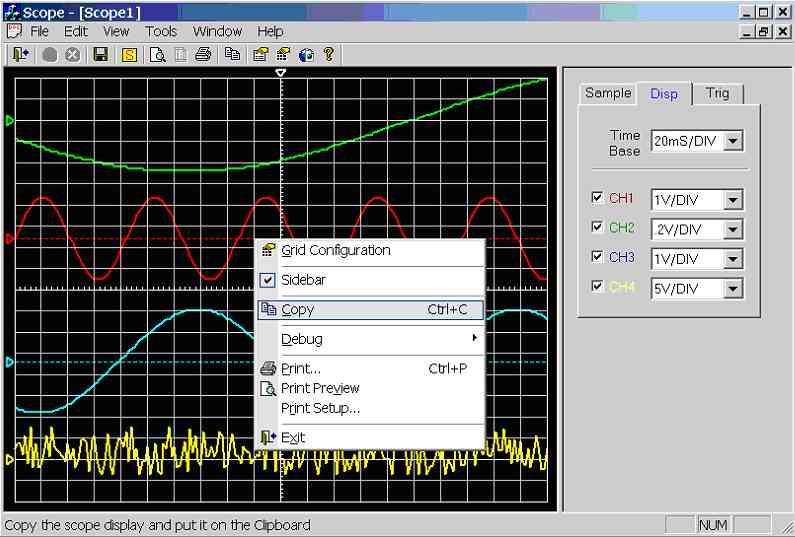 Figure 7.9a.
Screen dump demonstrating how to copy the scope display to the clipboard
(Scope V1.038a, 04/04/2002)
Figure 7.9a.
Screen dump demonstrating how to copy the scope display to the clipboard
(Scope V1.038a, 04/04/2002)
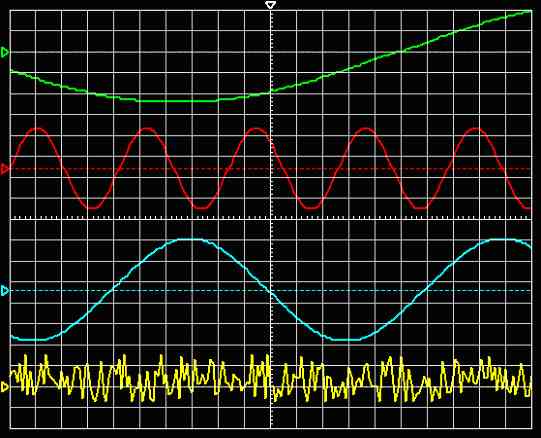 Figure 7.9b.
Scope display was pasted into this document from the clipboard
Figure 7.9b.
Scope display was pasted into this document from the clipboard
|
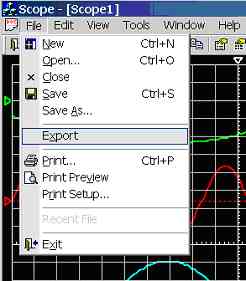 Figure 7.10a.
User clicks [Export]
Figure 7.10a.
User clicks [Export]
|
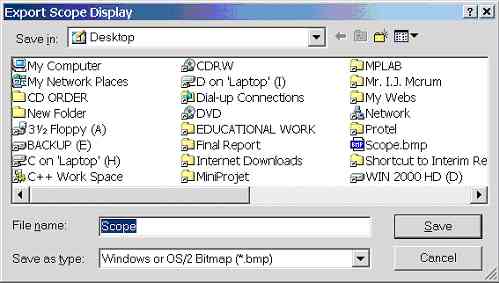 Figure 7.10b.
Save dialogue box appears
Figure 7.10b.
Save dialogue box appears
|
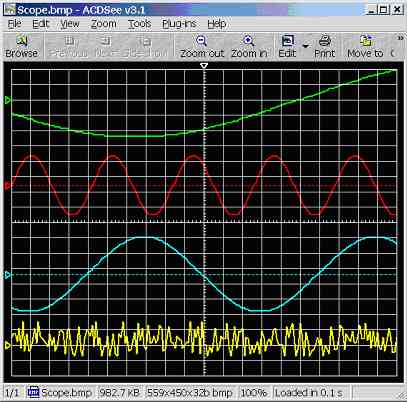 Figure 7.10c.
Screen dump of exported file scope.bmp
Figure 7.10c.
Screen dump of exported file scope.bmp
|
HANDLE CScopeView::DDBToDIB(CBitmap &bitmap, DWORD dwCompression, CPalette *pPal)
{
/* -----------------------------------------------------------
   | Fuction:     HANDLE CScopeView::DDBToDIB(...)           |
   | Description: Convert Device-Dependent Bitmap (DDB) to   |
   |              Device-independent Bitmap (DIB).           |
   | Return:      Void.                                      |
   | Date:        16/02/2002                                 |
   | Verison:     1.3                                        |
   | By:          Colin K McCord                             |
   ----------------------------------------------------------- */

        // DDBToDIB            - Creates a DIB from a DDB
        // bitmap              - Device dependent bitmap
        // dwCompression- Type of compression - see BITMAPINFOHEADER
        // pPal                - Logical palette


        BITMAP                        bm;
        BITMAPINFOHEADER       bi;
        LPBITMAPINFOHEADER     lpbi;
        DWORD                         dwLen;
        HANDLE                        hDIB;
        HANDLE                        handle;
        HDC                           hDC;
        HPALETTE                      hPal;


        ASSERT( bitmap.GetSafeHandle() );

        // The function has no arg for bitfields
        if( dwCompression == BI_BITFIELDS )
               return NULL;

        // If a palette has not been supplied use defaul palette
        hPal = (HPALETTE) pPal->GetSafeHandle();
        if (hPal==NULL)
               hPal = (HPALETTE) GetStockObject(DEFAULT_PALETTE);

        // Get bitmap information
        bitmap.GetObject(sizeof(bm),(LPSTR)&bm);

        // Initialize the bitmapinfoheader
        bi.biSize                     = sizeof(BITMAPINFOHEADER);
        bi.biWidth                    = bm.bmWidth;
        bi.biHeight            = bm.bmHeight;
        bi.biPlanes            = 1;
        bi.biBitCount          = bm.bmPlanes * bm.bmBitsPixel;
        bi.biCompression       = dwCompression;
        bi.biSizeImage         = 0;
        bi.biXPelsPerMeter     = 0;
        bi.biYPelsPerMeter     = 0;
        bi.biClrUsed           = 0;
        bi.biClrImportant      = 0;

        // Compute the size of the  infoheader and the color table
        int nColors = (1 << bi.biBitCount);

        dwLen  = bi.biSize + nColors * sizeof(RGBQUAD);

        // We need a device context to get the DIB from
        hDC = ::GetDC(NULL);

        hPal = SelectPalette(hDC,hPal,FALSE);
        RealizePalette(hDC);

        // Allocate enough memory to hold bitmapinfoheader and color table
        hDIB = GlobalAlloc(GMEM_FIXED,dwLen);

        if (!hDIB)
        {
               SelectPalette(hDC,hPal,FALSE);
               ::ReleaseDC(NULL,hDC);
               return NULL;
        }

        lpbi = (LPBITMAPINFOHEADER)hDIB;

        *lpbi = bi;

        // Call GetDIBits with a NULL lpBits param, so the device driver
        // will calculate the biSizeImage field
        GetDIBits(hDC, (HBITMAP)bitmap.GetSafeHandle(), 0L, (DWORD)bi.biHeight,
                       (LPBYTE)NULL, (LPBITMAPINFO)lpbi, (DWORD)DIB_RGB_COLORS);

        bi = *lpbi;

        // If the driver did not fill in the biSizeImage field, then compute it
        // Each scan line of the image is aligned on a DWORD (32bit) boundary
        if (bi.biSizeImage == 0){
               bi.biSizeImage = ((((bi.biWidth * bi.biBitCount) + 31) & ~31) / 8)
                                             * bi.biHeight;

               // If a compression scheme is used the result may infact be larger
               // Increase the size to account for this.
               if (dwCompression != BI_RGB)
                       bi.biSizeImage = (bi.biSizeImage * 3) / 2;
        }

        // Realloc the buffer so that it can hold all the bits
        dwLen += bi.biSizeImage;
        if (handle = GlobalReAlloc(hDIB, dwLen, GMEM_MOVEABLE))
               hDIB = handle;
        else{
               GlobalFree(hDIB);

               // Reselect the original palette
               SelectPalette(hDC,hPal,FALSE);
                       ::ReleaseDC(NULL,hDC);
               return NULL;
        }

        // Get the bitmap bits
        lpbi = (LPBITMAPINFOHEADER)hDIB;

        // FINALLY get the DIB
        BOOL bGotBits = GetDIBits( hDC, (HBITMAP)bitmap.GetSafeHandle(),
                              0L,                           // Start scan line
                              (DWORD)bi.biHeight,           // # of scan lines
                              (LPBYTE)lpbi                  // address for bitmap bits
                              + (bi.biSize + nColors * sizeof(RGBQUAD)),
                              (LPBITMAPINFO)lpbi,           // address of bitmapinfo
                              (DWORD)DIB_RGB_COLORS);       // Use RGB for colour table

        if( !bGotBits )
        {
               GlobalFree(hDIB);
               SelectPalette(hDC,hPal,FALSE);
               ::ReleaseDC(NULL,hDC);
               return NULL;
        }

        SelectPalette(hDC,hPal,FALSE);
        ::ReleaseDC(NULL,hDC);
        return hDIB;
}
|
void CScopeView::OnFileExport()
{
/* -----------------------------------------------------------
   | Fuction:     void CScopeView::OnFileExport()            |
   | Description: User specifies filename using CFileDialog, |
   |              then the scope display is save to that     |
   |               filename using the standard bitmap         |
   |             graphic format.                            |
   | Return:      Void.                                      |
   | Date:        16/02/2002                                 |
   | Verison:     1.1                                        |
   | By:          Colin K McCord                             |
   ----------------------------------------------------------- */


        HANDLE         hDIB;
        CRect          rect;
        CClientDC      dc(this);
        CDC            memDC;
        CBitmap        bitmap;
        GetClientRect(&rect);

        // Create memDC
        memDC.CreateCompatibleDC(&dc);
        bitmap.CreateCompatibleBitmap(&dc, rect.Width(), rect.Height());
        CBitmap* pOldBitmap = memDC.SelectObject(&bitmap);

        // Fill in memDC
        memDC.FillSolidRect(rect, dc.GetBkColor());
        // Redraw grid to memory DC
        if (memDC.GetSafeHdc() != NULL)
        {
               // first drop the grid on the memory dc
               memDC.BitBlt(0, 0, m_nClientWidth, m_nClientHeight,
                                      &m_dcGrid, 0, 0, SRCCOPY);
               // now add the plot on top as a "pattern" via SRCPAINT.
               // works well with dark background and a light plot
               memDC.BitBlt(0, 0, m_nClientWidth, m_nClientHeight,
                              &m_dcCH1, 0, 0, SRCPAINT);  //SRCPAINT
               memDC.BitBlt(0, 0, m_nClientWidth, m_nClientHeight,
                              &m_dcCH2, 0, 0, SRCPAINT);  //SRCPAINT

               memDC.BitBlt(0, 0, m_nClientWidth, m_nClientHeight,
                              &m_dcCH3, 0, 0, SRCPAINT);  //SRCPAINT
               memDC.BitBlt(0, 0, m_nClientWidth, m_nClientHeight,
                              &m_dcCH4, 0, 0, SRCPAINT);  //SRCPAINT


        }
        /* Convert Device-Dependent Bitmap (DDB) to Device-independent Bitmap (DIB) */
        hDIB = DDBToDIB(bitmap, BI_RGB, NULL);

        CFileDialog dlg (FALSE, _T("*.bmp"), _T("Scope"), OFN_HIDEREADONLY,_T("Windows or OS/2
        Bitmap (*.bmp)|*.bmp||"));
        dlg.m_ofn.lpstrTitle = "Export Scope Display";
        if (IDOK == dlg.DoModal())
        {
               /* Check for existence */
               if( (_access(dlg.GetPathName(), 0 )) != -1 )
               {
                       if(MessageBox("File '" + dlg.GetPathName() + "' Already exists. Do you want
                       to replace the existing file ?","Export Scope Display", MB_YESNO |
                       MB_ICONINFORMATION) != IDYES)
                              return;
               }
WriteDIB(dlg.GetPathName(),hDIB); // Save as Bitmap
} } |
BOOL CScopeView::WriteDIB(CString szFile, HANDLE hDIB)
{
/* -----------------------------------------------------------
   | Fuction:     BOOL CScopeView::WriteDIB(........)        |
   | Description: Writes bitmap to specified file.           |
   | Return:      Void.                                      |
   | Date:        16/02/2002                                 |
   | Verison:     1.1                                        |
   | By:          Colin K McCord                             |
   ----------------------------------------------------------- */

        // WriteDIB            - Writes a DIB to file
        // Returns             - TRUE on success
        // szFile              - Name of file to write to
        // hDIB                - Handle of the DIB

        BITMAPFILEHEADER       hdr;
        LPBITMAPINFOHEADER     lpbi;

        if (!hDIB)
               return FALSE;

        CFile file;
        if( !file.Open( szFile, CFile::modeWrite|CFile::modeCreate) )
               return FALSE;

        lpbi = (LPBITMAPINFOHEADER)hDIB;

        int nColors = 1 << lpbi->biBitCount;

        // Fill in the fields of the file header
        hdr.bfType             = ((WORD) ('M' << 8) | 'B');  // is always "BM"
        hdr.bfSize             = GlobalSize (hDIB) + sizeof( hdr );
        hdr.bfReserved1        = 0;
        hdr.bfReserved2        = 0;
        hdr.bfOffBits          = (DWORD) (sizeof( hdr ) + lpbi->biSize +
                                             nColors * sizeof(RGBQUAD));

        // Write the file header
        file.Write( &hdr, sizeof(hdr) );

        // Write the DIB header and the bits
        file.Write( lpbi, GlobalSize(hDIB) );

        return TRUE;

}
|
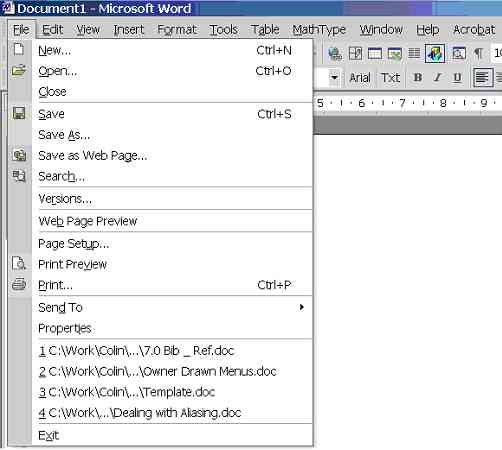 Figure 7.11a.
Microsoft Word XP file menu
Figure 7.11a.
Microsoft Word XP file menu
|
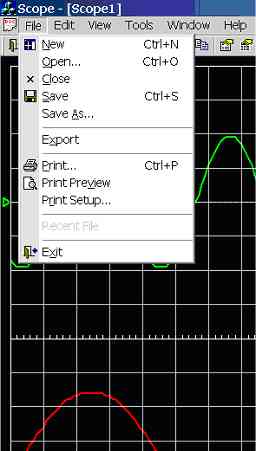 Figure 7.11b.
Scope Ver1.036a file Menu
Figure 7.11b.
Scope Ver1.036a file Menu
|
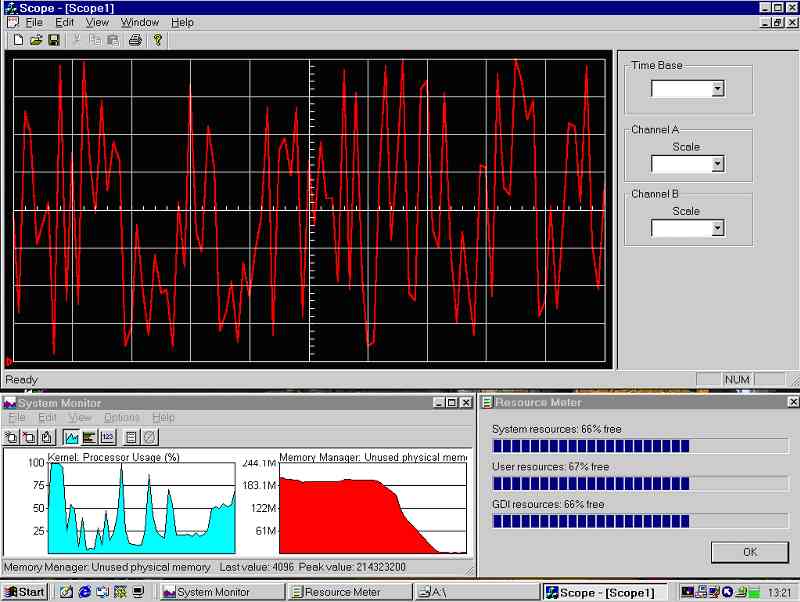 Figure 7.12a:
Screen dump of ‘System
Monitor’, ‘Resource Meter’ and ‘Scope’ V1.008a running in Windows 98
Figure
7.12a clearly shows that there is a problem; CPU load is high, systems
resources are dropping fast and free physical memory has been completely used
up. Note that this screen dump was taken after 10 seconds, the system
resources continue dropping; after a minute the system resources were less
than 10% and the system was completely unusable.
The
reason why the screen dump (figure 7.12a) was taken after 10 seconds was
because the system resources got so low that it was impossible to capture the
screen. Screen dump (figure 7.12b) was taken after 40 seconds, notice that it
was impossible to get a colour image, after a minute it was completely
impossible to capture the screen.
Clearly there must be a big memory leak problem.
Figure 7.12a:
Screen dump of ‘System
Monitor’, ‘Resource Meter’ and ‘Scope’ V1.008a running in Windows 98
Figure
7.12a clearly shows that there is a problem; CPU load is high, systems
resources are dropping fast and free physical memory has been completely used
up. Note that this screen dump was taken after 10 seconds, the system
resources continue dropping; after a minute the system resources were less
than 10% and the system was completely unusable.
The
reason why the screen dump (figure 7.12a) was taken after 10 seconds was
because the system resources got so low that it was impossible to capture the
screen. Screen dump (figure 7.12b) was taken after 40 seconds, notice that it
was impossible to get a colour image, after a minute it was completely
impossible to capture the screen.
Clearly there must be a big memory leak problem.
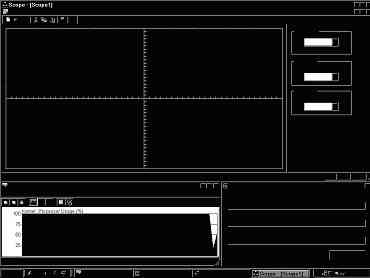 Figure 7.12b: Screen dump of Windows 98 running ‘Scope’ V1.008a taken after 40 seconds |
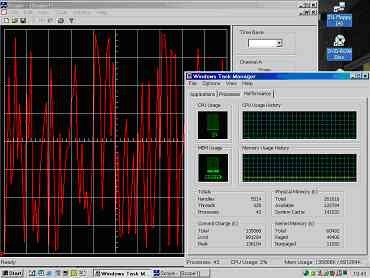 Figure 7.12c:
Screen dump of
Windows 2000 running ‘Scope’ V1.008a
Figure 7.12c:
Screen dump of
Windows 2000 running ‘Scope’ V1.008a
|
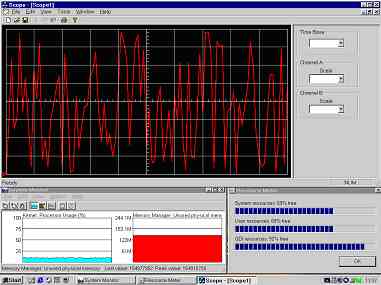 Figure 7.12d:
Screen dump of
Windows 98 running ‘Scope’ V1.010a
Figure 7.12d:
Screen dump of
Windows 98 running ‘Scope’ V1.010a
|
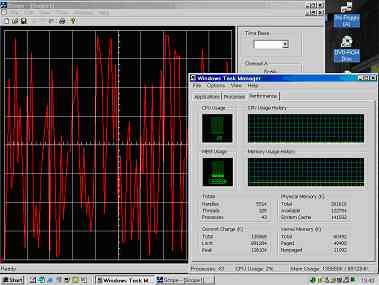 Figure 7.12e:
Screen dump of
Windows 2000 running ‘Scope’ V1.010a
Figure 7.12e:
Screen dump of
Windows 2000 running ‘Scope’ V1.010a
|
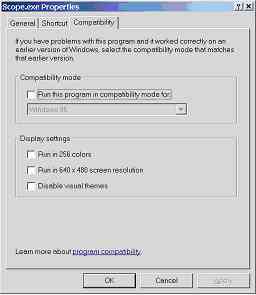 Figure 7.13a.
Screen dump of Compatibility option in Win XP
Figure 7.13a.
Screen dump of Compatibility option in Win XP
|
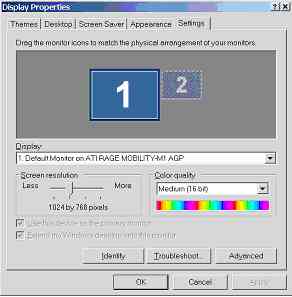 Figure 7.13b.
Screen dump of display properties in Win XP
Figure 7.13b.
Screen dump of display properties in Win XP
|
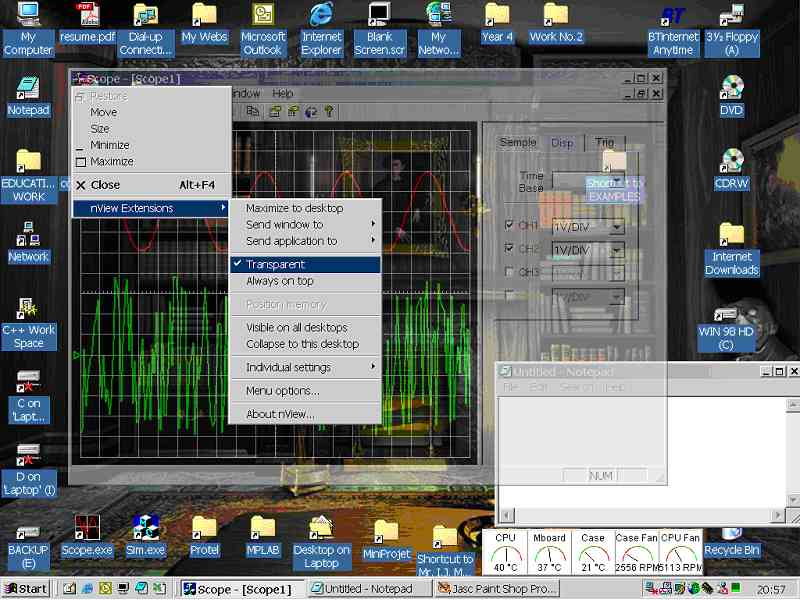 Figure 7.14a.
Demonstrating the transparent window feature, added to the windows system menu
by the video card drivers.
Figure
7.14a demonstrates the transparent window feature that was added to the
windows system menu by video card drivers. Clearly this feature requires
hardware acceleration; hence it is plausible that all windows based drawing is
being acceleration by hardware.
Figure 7.14a.
Demonstrating the transparent window feature, added to the windows system menu
by the video card drivers.
Figure
7.14a demonstrates the transparent window feature that was added to the
windows system menu by video card drivers. Clearly this feature requires
hardware acceleration; hence it is plausible that all windows based drawing is
being acceleration by hardware.
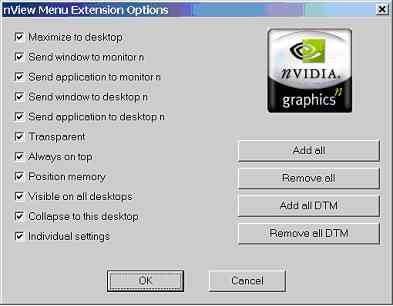 Figure 7.14b.
nView Menu Extension Options
Figure 7.14b.
nView Menu Extension Options
|
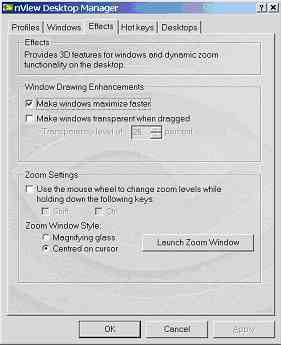 Figure 7.14c.
nView Desktop Manager
Figure 7.14c.
nView Desktop Manager
|
This Web Page was last updated on Friday June 28, 2002
Home About me National Record Of Achievement Hobbies / Interests Guest Book Contact Me Links Snooker Amateur Radio Site Map
|
© 2002 Designed by Colin K McCord |
|
This website is best viewed by Microsoft Internet Explorer 6.0 at a resolution of 1024 x 768